Introduction
This is the documentation for my home Kubernetes cluster running on Talos Linux, managed with Flux.
These docs are specific to my setup. They may or may not work for you, but hopefully they're useful as a reference.









This is the documentation for my home Kubernetes cluster running on Talos Linux, managed with Flux.
These docs are specific to my setup. They may or may not work for you, but hopefully they're useful as a reference.
This repository is my home Kubernetes cluster in a declarative state. Flux watches the kubernetes folder and will make the changes to the cluster based on the YAML manifests.
 Core Components
Core components that form the foundation of the cluster:
 Observability
For observability and monitoring of the cluster the following software is used:
 Automation
 Cloud Dependencies
Total cloud costs yearly is approximately ~$150/year.
 Directories
This Git repository contains the following directories.
📁 bootstrap       # Flux installation to bootstrap cluster
📁 docs            # Docs
📁 hacks           # Contains random scripts
📁 kubernetes      # Kubernetes cluster defined as code
├─📁 flux          # Main Flux configuration of repository
├─📁 components    # Flux components
└─📁 apps          # Apps deployed into my cluster grouped by namespace
📁 talos           # Contains the configuration for Talos operating system
📁 terraform       # Contains Cloudflare terraform
 Hardware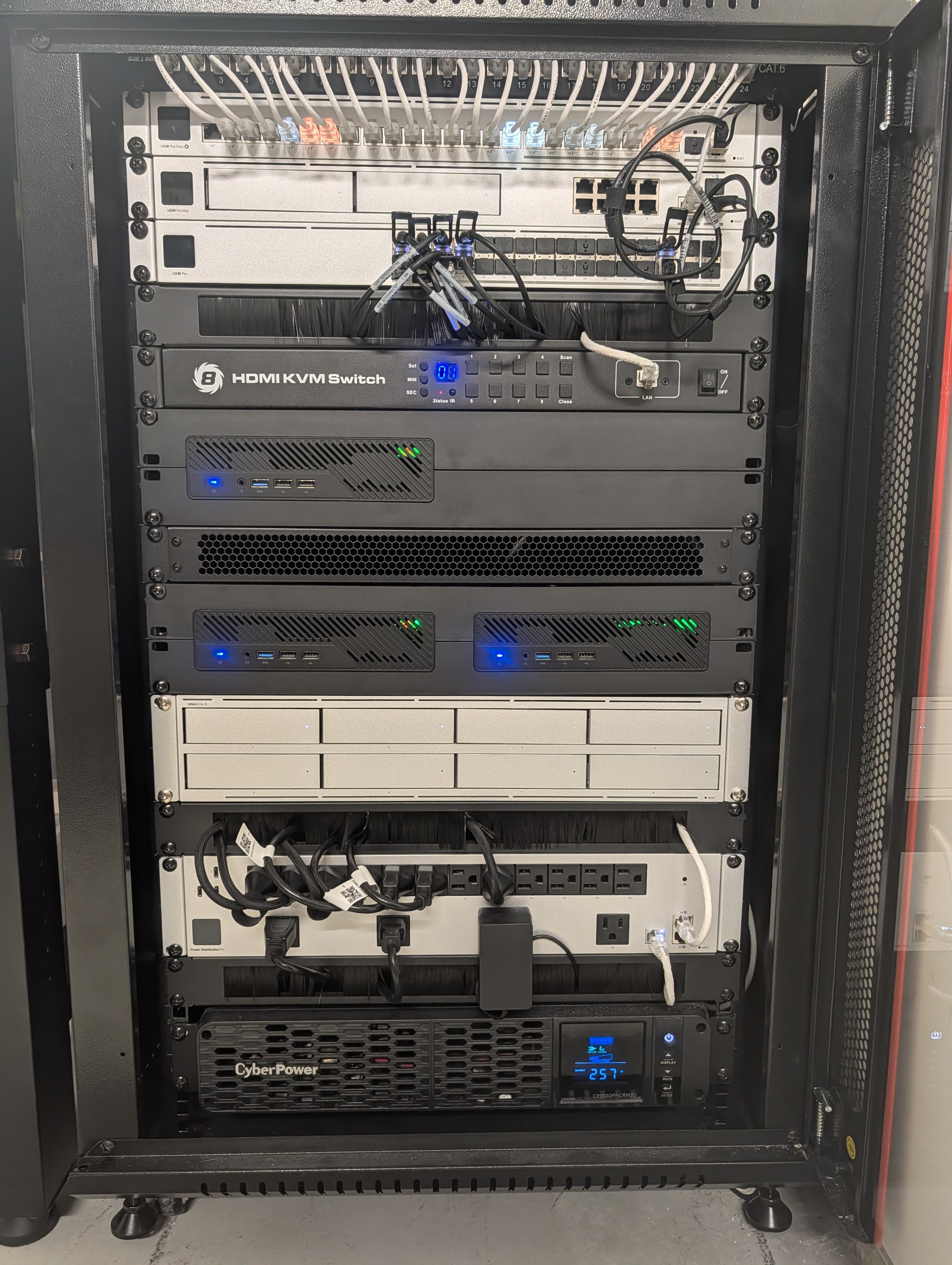
| Device | Count | OS Disk Size | Data Disk Size | Ram | Operating System | Purpose |
|---|---|---|---|---|---|---|
| UDM-Pro-Max | 1 | - | - | - | UniFi | Router |
| USW-Pro-Aggregation | 1 | - | - | - | UniFi | Switch |
| USW-Pro-Max-24-PoE | 1 | - | - | - | UniFi | Switch |
| UAP-AC-Lite | 1 | - | - | - | UniFi | WiFi AP |
| ER-10X | 1 | - | - | - | EdgeOS | Switch |
| PiKVM V4 Mini | 1 | - | - | - | PiKVM | KVM |
| TESmart HDMI KVM Switch 8 Ports | 1 | - | - | - | - | KVM Switch |
| CyberPower CP1500PFCRM2U | 1 | - | - | - | UPS | |
| USP-PDU-Pro | 1 | - | - | - | UniFi | PDU |
| Synology DS920+ | 1 | - | 2x8TB & 2x16TB | 20GB | DSM | NAS |
| MS-01 i9-13900H | 3 | 1TB | 2TB | 96GB | Talos | Control Plane |
 Graditude and Thanks
Thanks to all the people who donate their time to the Kubernetes @Home community.
This repository was built off the onedr0p/template-cluster-k3s repository.
 Star History
 License
See LICENSE
What you need to manage the cluster from your machine.
# Install Homebrew packages
task workstation:brew

# Install kubectl plugins
task workstation:krew
Everything gets installed via Homebrew.
| Tool | Purpose |
|---|---|
kubernetes-cli | kubectl |
talosctl | Talos node management |
flux | Flux CLI |
helm | Helm |
helmfile | Declarative Helm |
kustomize | Kustomize |
| Tool | Purpose |
|---|---|
go-task | Task runner |
jq | JSON wrangling |
yq | YAML wrangling |
age | Encryption |
sops | Secret operations |
| Tool | Purpose |
|---|---|
k9s | Terminal UI for Kubernetes |
kubecolor | Colorized kubectl |
stern | Multi-pod log tailing |
viddy | Modern watch command |
| Tool | Purpose |
|---|---|
cloudflared | Cloudflare tunnel |
gh | GitHub CLI |
talhelper | Talos config helper |
minijinja-cli | Template rendering |
| Tool | Purpose |
|---|---|
1password | 1Password app |
1password-cli | 1Password CLI |
Installed via Krew:
| Plugin | Purpose |
|---|---|
browse-pvc | Browse PVC contents |
node-shell | Shell into nodes |
rook-ceph | Rook-Ceph commands |
view-secret | Decode secrets |
cert-manager | Cert-manager commands |
cnpg | CloudNativePG commands |
The kubeconfig is at kubernetes/kubeconfig. Set the environment variable:
export KUBECONFIG=/path/to/home-cluster/kubernetes/kubeconfig
Or add to your shell profile.
Talos config lives in ~/.talos/config or wherever TALOSCONFIG points.
Regenerate it with:
task talos:kubeconfig
Authenticate:
eval $(op signin)
Check it works:
op user get --me
Add these to your .zshrc or .bashrc:
alias k='kubectl'
alias kc='kubecolor'
alias f='flux'
alias watch='viddy'
alias logs='stern'
source <(kubectl completion zsh)
source <(flux completion zsh)
source <(talosctl completion zsh)
source <(helm completion zsh)
kubectl get nodes
talosctl version
flux check
op user get --me
# Homebrew
brew update && brew upgrade

# Krew plugins
kubectl krew upgrade

# Resync with Brewfile
task workstation:brew
The process should be mostly automated via task bootstrap:apps. If all goes well the cluster should come up based on the last available Volsync snapshot, which runs daily.
Enabling Secure Boot on MS-01 can be difficult if its not something you have done before, heres how to do it:
Security->Secure Boot change to customKey ManagementFactory Key Provision to disabledReset To Setup Mode
cancel when it says save without exitingEnroll secure boot keys: autoIf you still see errors on start about key violations it probably means the factory default keys weren't wiped (step 4). Make sure changes are saved before rebooting.
Flux manages the state of the cluster, but it can't do that until its installed. A few things need to be manually installed first:
All of these get installed with a single command from the bootstrap Taskfile:
task bootstrap:apps
This applies bootstrap resources for 1Password and Cloudflare tunnel, then installs everything via helmfile.
Some notes on my current home network setup.
flowchart TB
    subgraph Internet
        WAN[("🌐 Internet")]
        CF[Cloudflare Tunnel]
    end

    subgraph Network["Network Infrastructure"]
        UDM["UDM Pro Max<br/>Gateway/Router<br/>192.168.1.1 | 10.0.40.1"]
        AGG["USW-Pro-Aggregation<br/>Switch"]
        POE["USW-Pro-Max-24-PoE<br/>Switch"]
        AP["UAP-AC-Lite<br/>WiFi AP"]
    end

    subgraph Servers["Kubernetes Cluster (10.0.40.0/24)"]
        M0["m0 - MS-01<br/>i9-13900H | 96GB<br/>10.0.40.10 | 169.254.255.10"]
        M1["m1 - MS-01<br/>i9-13900H | 96GB<br/>10.0.40.11 | 169.254.255.11"]
        M2["m2 - MS-01<br/>i9-13900H | 96GB<br/>10.0.40.12 | 169.254.255.12"]

        subgraph TB_Ring["Thunderbolt Ring (169.254.255.0/24)"]
            CEPH[("Rook-Ceph<br/>3x 2TB NVMe")]
        end
    end

    subgraph Storage["Storage (10.0.40.0/24)"]
        NAS["UNAS Pro 8<br/>4x 28TB (112TB raw)<br/>10.0.40.x"]
    end

    subgraph HomeLAN["Home Network (192.168.1.0/24)"]
        Devices["Computers, TVs,<br/>Phones, Tablets, etc."]
    end

    subgraph IoT["IoT VLAN 10 (10.0.10.0/24)"]
        HA["Home Assistant<br/>10.0.10.250"]
        Frigate["Frigate NVR<br/>10.0.10.239"]
        ESPHome["ESPHome<br/>10.0.10.245"]
        Zigbee["Zigbee2MQTT"]
        ZWave["Z-Wave JS UI"]
    end

    subgraph Services["K8s Services (10.0.20.0/24)"]
        MQTT["EMQX MQTT<br/>10.0.20.50"]
        Plex["Plex<br/>10.0.20.110"]
        Jellyfin["Jellyfin<br/>10.0.20.70"]
        PG["PostgreSQL<br/>10.0.20.17"]
        Envoy["Envoy Gateway<br/>External: 10.0.20.100<br/>Internal: 10.0.20.200"]
    end

    subgraph Mgmt["Management"]
        PiKVM["PiKVM V4 Mini"]
        UPS["CyberPower UPS"]
        PDU["UniFi PDU Pro"]
    end

    WAN --> UDM
    CF -.-> UDM
    UDM --> AGG
    AGG --> POE
    POE --> AP
    POE --> Devices
    AP -.->|"WiFi"| Devices
    AGG -->|"10Gb LACP"| M0
    AGG -->|"10Gb LACP"| M1
    AGG -->|"10Gb LACP"| M2
    M0 <-->|"TB4"| CEPH
    M1 <-->|"TB4"| CEPH
    M2 <-->|"TB4"| CEPH
    AGG -->|"10Gb"| NAS
    UDM -->|"VLAN 10"| IoT
    UDM <-.->|"BGP<br/>ASN 64513 ↔ 64514"| Servers
    Servers --> Services
    PiKVM --> Servers
    UPS --> PDU
    PDU --> Servers

    classDef router fill:#e74c3c,color:white
    classDef switch fill:#3498db,color:white
    classDef server fill:#2ecc71,color:white
    classDef storage fill:#f39c12,color:white
    classDef iot fill:#9b59b6,color:white
    classDef service fill:#1abc9c,color:white
    classDef tbring fill:#e67e22,color:white
    classDef homelan fill:#95a5a6,color:white

    class UDM router
    class AGG,POE,AP switch
    class M0,M1,M2 server
    class NAS storage
    class CEPH tbring
    class HA,Frigate,ESPHome,Zigbee,ZWave iot
    class MQTT,Plex,Jellyfin,PG,Envoy service
    class Devices homelan
192.168.1.0/24 - LAN192.168.33.0/24 - Wireguard10.0.10.0/24 - IoT (VLAN10)10.0.20.0/24 - Cilium LoadBalancer Pool10.0.40.0/24 - ServersI use Cilium to support LoadBalancer services in the cluster. Cilium manages the 10.0.20.0/24 subnet for IP allocation. BGP is configured between Cilium and my UDM Pro to provide routing for the rest of my home network.
flowchart LR
    subgraph Internet
        Users["External Users"]
        ExtDNS["External DNS<br/>(Cloudflare)"]
        CFEdge["Cloudflare Edge<br/>*.chestr.dev"]
    end

    subgraph HomeNet["Home Network"]
        HomeUsers["Internal Users"]
        UDM["UDM Pro Max<br/>ASN 64513"]
    end

    subgraph Nodes["Cluster Nodes (m0, m1, m2)"]
        subgraph K8s["Kubernetes"]
            subgraph Gateways["Envoy Gateways"]
                ExtGW["External Gateway<br/>10.0.20.200"]
                IntGW["Internal Gateway<br/>10.0.20.100"]
            end

            CFTunnel["Cloudflared<br/>Tunnel Pod"]

            subgraph Apps["Application Pods"]
                ExtApps["External Apps<br/>Plex, Home Assistant, Radicale"]
                IntApps["Internal Apps<br/>Frigate, Sonarr, Radarr"]
            end

            ExtDNSOp["External-DNS Operator"]
        end
    end

    Users --> ExtDNS
    ExtDNS -->|HTTPS| CFEdge
    CFEdge -->|Tunnel| CFTunnel
    CFTunnel --> ExtGW
    ExtGW --> ExtApps

    HomeUsers --> UDM
    UDM --> ExtGW
    UDM --> IntGW
    IntGW --> IntApps

    ExtDNSOp -.->|Sync| ExtDNS
    ExtDNSOp -.->|Sync| UDM

    Nodes <-->|"BGP<br/>ASN 64514"| UDM

    classDef cloudflare fill:#f38020,color:white
    classDef gateway fill:#1abc9c,color:white
    classDef extapps fill:#3498db,color:white
    classDef intapps fill:#9b59b6,color:white
    classDef router fill:#e74c3c,color:white

    class CFEdge,CFTunnel,ExtDNS cloudflare
    class ExtGW,IntGW gateway
    class ExtApps extapps
    class IntApps intapps
    class UDM router
External Traffic (Internet → Services):
app.chestr.devInternal Traffic (Home Network → Services):
app.chestr.devSplit Horizon DNS:
169.254.255.0/24 is used for the ring network. Each node is connected to the other 2 nodes using the 2 thunderbolt ports on each computer.
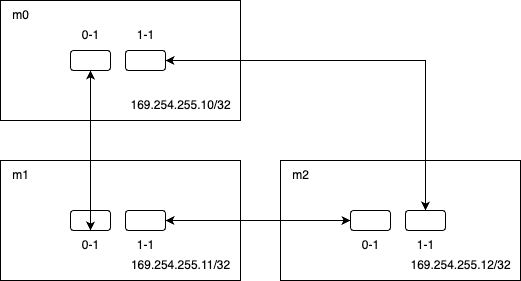
Spin up 3 node-shells:
task kubernetes:node-shell NODE=m0
task kubernetes:node-shell NODE=m1
task kubernetes:node-shell NODE=m2
Check routes are configured correctly:
ip r | grep '169.254.255'
Ping each node and make sure it works:
# From m0
ping 169.254.255.11
ping 169.254.255.12
# etc...
I use all the standard Prometheus CRDs for metric collection - ServiceMonitor, PodMonitor, PrometheusRules, etc.
For metrics storage I use Victoria Metrics. VM is a drop-in replacement for Prometheus which claims to be more performant. For the most part it seems to work well.
Why I switched from Prometheus:
For log collection I use FluentBit. I used to use vector/promtail but gave fluentbit a try and prefer it over the others. It uses minimal resources (~10 mCPU / 15MB RAM) and is fairly easy to configure for label normalization/cleaning.
For log storage I use Victoria Logs. I switched from Loki and much prefer VM Logs over Loki+Grafana for querying.
Why I switched from Loki:
For alerting I use AlertManager via Victoria Metrics.
I run 2 instances of VMAlert - one for Victoria Metrics rules and one for Victoria Logs rules. Two instances are needed because the query languages are different and would fail if run against the wrong backend.
For push notifications I paid $5 for PushOver and it works great.
For things not in this repo, I use a few external services.
I use Dynamic DNS on my UDM Pro to automatically update an A Record in Cloudflare with my home public IP.
I have 2 push monitors on HealthChecks.io to track cluster status externally. They have free push monitors which is why I use it.
Watchdog pings healthchecks.io every 5 minutes - this ensures my alerting is workingI use UptimeRobot to periodically ping the DNS A record set by my UDM to monitor that my home network is reachable externally. Free for 5 minute pings.
Notes on Rook-Ceph management and troubleshooting.
kubectl -n rook-ceph exec -it deploy/rook-ceph-tools -- ceph status
You want to see HEALTH_OK. If not, check whats wrong:
kubectl -n rook-ceph exec -it deploy/rook-ceph-tools -- ceph health detail
Other useful commands:
# OSD tree
kubectl -n rook-ceph exec -it deploy/rook-ceph-tools -- ceph osd tree

# Pool usage
kubectl -n rook-ceph exec -it deploy/rook-ceph-tools -- ceph df

# OSD usage
kubectl -n rook-ceph exec -it deploy/rook-ceph-tools -- ceph osd df
If a node died and you need to clean up the OSD (adapted from Mirantis docs):
# Check status
kubectl -n rook-ceph exec -it deploy/rook-ceph-tools -- ceph -s

# Scale down the OSD (probably stuck in Pending if node is dead)
kubectl -n rook-ceph scale deploy rook-ceph-osd-<ID> --replicas 0

# Purge it
kubectl -n rook-ceph exec -it deploy/rook-ceph-tools -- ceph osd purge <ID> --yes-i-really-mean-it

# Delete auth
kubectl -n rook-ceph exec -it deploy/rook-ceph-tools -- ceph auth del osd.<ID>

# Remove node from CRUSH map if decomissioning
kubectl -n rook-ceph exec -it deploy/rook-ceph-tools -- ceph osd crush remove <nodename>
Ceph needs clean drives. If you've used the disk before, wipe it:
cat <<EOF | kubectl apply -f -
apiVersion: v1
kind: Pod
metadata:
  name: disk-clean-rook
  namespace: rook-ceph
spec:
  restartPolicy: Never
  nodeName: <nodename>
  volumes:
  - name: rook-data-dir
    hostPath:
      path: /var/lib/rook
  containers:
  - name: disk-clean
    image: busybox
    securityContext:
      privileged: true
    volumeMounts:
    - name: rook-data-dir
      mountPath: /node/rook-data
    command: ["/bin/sh", "-c", "rm -rf /node/rook-data/*"]
EOF
Wait for it then clean up:
kubectl -n rook-ceph delete pod disk-clean-rook
Sometimes after moving a disk between nodes, the OSD fails with permission issues. Fix from this GitHub issue:
Debug the OSD pod and grab the keyring:
kubectl -n rook-ceph debug rook-ceph-osd-<ID>-<suffix>
cat /var/lib/ceph/osd/ceph-<ID>/keyring
Create a file locally called osd.export:
[osd.<ID>]
key = <key from keyring>
caps mon = "allow profile osd"
caps mgr = "allow profile osd"
caps osd = "allow *"
Import it:
kubectl -n rook-ceph exec -it deploy/rook-ceph-tools -- ceph auth import -i osd.export
Clean up the debug pod
The OSD should join and cluster should recover.
To poke around in a PVC:
task kubernetes:browse-pvc NS=media CLAIM=plex-config
This mounts it in an Alpine container for you to look around.
Before doing storage maintenance, prevent Ceph from rebalancing:
kubectl -n rook-ceph exec -it deploy/rook-ceph-tools -- ceph osd set noout
Do your thing, then unset it:
kubectl -n rook-ceph exec -it deploy/rook-ceph-tools -- ceph osd unset noout
How to manage Talos nodes - config, maintenance, and recovery.
| Node | Role | Hardware |
|---|---|---|
| m0 | Control Plane | MS-01 i9-13900H, 96GB RAM, 1TB OS + 2TB Data |
| m1 | Control Plane | MS-01 i9-13900H, 96GB RAM, 1TB OS + 2TB Data |
| m2 | Control Plane | MS-01 i9-13900H, 96GB RAM, 1TB OS + 2TB Data |
All three are control plane nodes with workloads scheduled on them.
task talos:apply-node NODE=<node>
| Option | Default | What it does |
|---|---|---|
MODE | auto | Apply mode - auto (Talos decides), reboot (force reboot), staged (apply on next reboot) |
Config files are in:
talos/
├── controlplane.yaml          # Base config
├── controlplane/
│   ├── m0.yaml               # Node-specific patches
│   ├── m1.yaml
│   └── m2.yaml
└── schematic.yaml             # Factory schematic for Secure Boot
task talos:reboot-node NODE=<node>
Add MODE=powercycle for a hard reboot if needed.
task talos:shutdown-cluster
To bring it back up, just power on the machines. Talos boots and rejoins automatically.
If kubeconfig expires or gets messed up:
task talos:kubeconfig
Before doing maintenance on a node:
Check things are healthy:
kubectl get nodes
kubectl -n rook-ceph exec -it deploy/rook-ceph-tools -- ceph status
Tell Ceph not to rebalance:
kubectl -n rook-ceph exec -it deploy/rook-ceph-tools -- ceph osd set noout
Cordon and drain:
kubectl cordon <node>
kubectl drain <node> --ignore-daemonsets --delete-emptydir-data
Do your maintenance
Uncordon:
kubectl uncordon <node>
Unset noout:
kubectl -n rook-ceph exec -it deploy/rook-ceph-tools -- ceph osd unset noout
If you need to wipe a node and start fresh:
task talos:reset-node NODE=<node>
This destroys everything on the node.
Nuclear option:
task talos:reset-cluster
Make sure you have backups before doing this.
talos/controlplane/<new-node>.yamltask talos:apply-node NODE=<new-node>kubectl get nodes -wkubectl drain <node> --ignore-daemonsets --delete-emptydir-datakubectl delete node <node>task talos:reset-node NODE=<node>For low-level debugging:
task kubernetes:node-shell NODE=<node>
This gives you a privileged shell on the node.
How to deploy apps using Flux.
kubernetes/
├── flux/                    # Flux config
├── components/             # Reusable components
└── apps/                   # Applications by namespace
    ├── cert-manager/
    ├── database/
    ├── default/
    ├── external-secrets/
    ├── flux-system/
    ├── kube-system/
    ├── media/
    ├── networking/
    ├── observability/
    ├── openebs-system/
    ├── rook-ceph/
    ├── system-upgrade/
    └── volsync-system/
Each app follows this pattern:
apps/<namespace>/<app-name>/
├── ks.yaml                 # Flux Kustomization
└── app/
    ├── kustomization.yaml
    ├── helmrelease.yaml
    └── externalsecret.yaml # If needed
mkdir -p kubernetes/apps/<namespace>/<app-name>/app
ks.yaml:
---
apiVersion: kustomize.toolkit.fluxcd.io/v1
kind: Kustomization
metadata:
  name: &app my-app
  namespace: flux-system
spec:
  targetNamespace: default
  commonMetadata:
    labels:
      app.kubernetes.io/name: *app
  path: ./kubernetes/apps/default/my-app/app
  prune: true
  sourceRef:
    kind: GitRepository
    name: flux-system
  wait: false
  interval: 30m
  retryInterval: 1m
  timeout: 5m
app/helmrelease.yaml:
---
apiVersion: helm.toolkit.fluxcd.io/v2
kind: HelmRelease
metadata:
  name: my-app
spec:
  interval: 30m
  chart:
    spec:
      chart: my-app
      version: 1.0.0
      sourceRef:
        kind: HelmRepository
        name: some-repo
        namespace: flux-system
  install:
    remediation:
      retries: 3
  upgrade:
    cleanupOnFail: true
    remediation:
      strategy: rollback
      retries: 3
  values:
    # your values here
app/kustomization.yaml:
---
apiVersion: kustomize.config.k8s.io/v1beta1
kind: Kustomization
resources:
  - helmrelease.yaml
Add your app to kubernetes/apps/<namespace>/kustomization.yaml:
resources:
  - ./my-app/ks.yaml
git add kubernetes/apps/<namespace>/<app-name>
git commit -m "feat: add my-app"
git push
Flux picks it up automatically.
task kubernetes:reconcile
flux get hr -n <namespace> <app>
flux get ks <app>
kubectl get pods -n <namespace> -l app.kubernetes.io/name=<app>
flux suspend ks <app>
flux suspend hr -n <namespace> <app>

flux resume ks <app>
flux resume hr -n <namespace> <app>
For Ceph storage, add a PVC:
apiVersion: v1
kind: PersistentVolumeClaim
metadata:
  name: my-app
spec:
  accessModes: ["ReadWriteOnce"]
  storageClassName: ceph-block
  resources:
    requests:
      storage: 10Gi
Create a ReplicationSource for Volsync:
apiVersion: volsync.backube/v1alpha1
kind: ReplicationSource
metadata:
  name: my-app
spec:
  sourcePVC: my-app
  trigger:
    schedule: "0 0 * * *"  # Daily
  restic:
    repository: my-app-restic-secret
    retain:
      daily: 7
      weekly: 4
For external access, use Gateway API:
apiVersion: gateway.networking.k8s.io/v1
kind: HTTPRoute
metadata:
  name: my-app
spec:
  parentRefs:
    - name: external
      namespace: networking
  hostnames: ["my-app.example.com"]
  rules:
    - backendRefs:
        - name: my-app
          port: 80
For internal only, use internal instead of external.
Renovate watches for updates and creates PRs automatically. Just review and merge them:
task github:pr:list
task github:pr:merge ID=<pr>
How I handle secrets using External Secrets and 1Password.
1Password -> 1Password Connect -> External Secrets Operator -> Kubernetes Secrets
All my secrets live in 1Password. The External Secrets Operator pulls them into the cluster automatically.
Add a new item to 1Password with the fields you need. The item name should match what you want the Kubernetes secret to be called.
Add this to your app's directory:
apiVersion: external-secrets.io/v1beta1
kind: ExternalSecret
metadata:
  name: my-app-secret
  namespace: default
spec:
  refreshInterval: 1h
  secretStoreRef:
    kind: ClusterSecretStore
    name: onepassword-connect
  target:
    name: my-app-secret
    creationPolicy: Owner
  dataFrom:
    - extract:
        key: my-1password-item
If you only need specific fields:
spec:
  data:
    - secretKey: api-key
      remoteRef:
        key: my-1password-item
        property: api_key
Commit to git and Flux will create the secret. Or apply manually:
kubectl apply -f externalsecret.yaml
Verify it worked:
kubectl get secret -n <namespace> <name>
kubectl get externalsecret -n <namespace> <name>
If you updated something in 1Password and don't want to wait for the refresh interval:
task kubernetes:sync-secrets
Or for a single secret:
kubectl -n <namespace> annotate externalsecret <name> force-sync="$(date +%s)" --overwrite
Check whats wrong:
kubectl describe externalsecret -n <namespace> <name>
Common issues:
| Error | Problem | Fix |
|---|---|---|
item not found | Item doesn't exist in 1Password | Create it |
field not found | Requested field missing | Add the field |
connect error | 1Password Connect is down | Check the pod |
# Check pod status
kubectl get pods -n external-secrets -l app=onepassword-connect

# Check logs
kubectl logs -n external-secrets -l app=onepassword-connect
Secrets refresh based on refreshInterval. Force it:
task kubernetes:sync-secrets
kubectl -n <ns> annotate externalsecret <name> force-sync="$(date +%s)" --overwritekubectl rollout restart deployment -n <ns> <deployment>If External Secrets is broken and you need a secret NOW:
kubectl create secret generic <name> -n <namespace> --from-literal=<key>=<value>
Just remember this will get overwritten when External Secrets starts working again. Update 1Password if you want changes to stick.
How to upgrade Talos, Kubernetes, and everything else.
Always a good idea to check things are healthy first:
kubectl get nodes
kubectl -n rook-ceph exec -it deploy/rook-ceph-tools -- ceph status
And maybe take a manual backup of anything critical:
task volsync:snapshot APP=<app> NS=<ns>
task talos:upgrade-node NODE=m0 VERSION=v1.9.0
This downloads the Talos version from the factory, applies it with secure boot, and reboots. Times out after 10 minutes.
For the whole cluster, just do them one at a time and wait for each to come back:
task talos:upgrade-node NODE=m0 VERSION=v1.9.0
# wait for it to rejoin
task talos:upgrade-node NODE=m1 VERSION=v1.9.0
# wait
task talos:upgrade-node NODE=m2 VERSION=v1.9.0
Between each, verify the node is Ready and Ceph is healthy:
kubectl get nodes
kubectl -n rook-ceph exec -it deploy/rook-ceph-tools -- ceph status
task talos:upgrade-k8s
This upgrades Kubernetes across all nodes. The version comes from kubernetes/apps/system-upgrade/tuppr/upgrades/kubernetes.yaml.
Renovate handles this automatically - it creates PRs when updates are available. Just review and merge them.
To force a reconcile after merging:
task kubernetes:reconcile
# List open PRs
task github:pr:list

# Merge one
task github:pr:merge ID=123

# Merge all of them
task github:pr:merge:all
Actions Runner Controller needs a special upgrade process because of CRD stuff:
task kubernetes:upgrade-arc
This uninstalls the runner and controller, waits a bit, then reconciles them back via Flux.
Talos keeps the previous install around. Reboot and pick the old one from the boot menu:
task talos:reboot-node NODE=<node> MODE=powercycle
Just revert the commit and push:
git revert <commit>
git push
task kubernetes:reconcile
Check whats happening:
talosctl -n <node> dmesg | tail -100
Force a reboot if needed:
task talos:reboot-node NODE=<node> MODE=powercycle
Regenerate kubeconfig:
task talos:kubeconfig
Restart failed releases:
task kubernetes:hr:restart
Notes on backups, restores, and what to do when things go wrong.
Volsync handles backup/restore for PVCs. There are some assumptions baked in:
task volsync:list APP=plex NS=media
If you need a backup right now instead of waiting for the daily schedule:
task volsync:snapshot APP=home-assistant NS=default
This waits up to 2 hours for the backup to complete.
task volsync:restore APP=plex NS=media PREVIOUS=2
PREVIOUS is how many snapshots back to restore (0 = latest, 1 = one before latest, etc).
What happens under the hood:
If a backup job got interrupted, the Restic repo might be locked:
task volsync:unlock
For maintenance:
task volsync:state-suspend
task volsync:state-resume
task volsync:list APP=<app> NS=<ns>task volsync:restore APP=<app> NS=<ns> PREVIOUS=<n>If recoverable, just reboot it:
task talos:reboot-node NODE=<node>
If it needs a full reinstall:
task talos:reset-node NODE=<node>
task talos:apply-node NODE=<node>
Ceph will rebalance automatically. Check health with:
kubectl -n rook-ceph exec -it deploy/rook-ceph-tools -- ceph status
This is the nuclear option. Hopefully you never need this.
task talos:apply-node NODE=m0
task talos:apply-node NODE=m1
task talos:apply-node NODE=m2
task bootstrap:talos
task bootstrap:apps ROOK_DISK=<disk-model>
Just force a Flux reconcile:
task kubernetes:reconcile
Flux will recreate whatever is missing from Git.
Common issues and how to fix them.
# Node status
kubectl get nodes -o wide

# All pods
kubectl get pods -A

# Recent events
kubectl get events -A --sort-by='.lastTimestamp' | tail -20

# Flux status
flux get all -A | grep -i false
kubectl describe pod -n <namespace> <pod>
| Cause | Fix |
|---|---|
| Not enough resources | Scale down other stuff or add capacity |
| Node selector doesn't match | Check node labels |
| PVC not bound | Check storage class and PVC |
| Taints blocking it | Add tolerations |
kubectl describe pod -n <namespace> <pod>
kubectl get events -n <namespace> --field-selector involvedObject.name=<pod>
| Cause | Fix |
|---|---|
| Image pull failed | Check image name and registry creds |
| Volume mount failed | Check PVC and CSI driver |
| Secret not found | Check ExternalSecret synced |
kubectl logs -n <namespace> <pod> --previous
Usually the app is crashing - check logs for stack traces.
task kubernetes:cleanse-pods
This removes pods in Failed, Pending, Succeeded, Completed, NodeStatusUnknown, or Error states.
flux get hr -A | grep False
kubectl describe helmrelease -n <namespace> <release>
Restart it:
task kubernetes:hr:restart
Or manually:
flux suspend hr -n <namespace> <release>
flux resume hr -n <namespace> <release>
Force a reconcile:
task kubernetes:reconcile
kubectl describe node <node>
talosctl -n <node> services
talosctl -n <node> dmesg | tail -50
| Cause | Fix |
|---|---|
| Kubelet not running | talosctl -n <node> service kubelet restart |
| Network issues | Check CNI pods |
| Disk pressure | Check disk usage |
Try a reboot:
task talos:reboot-node NODE=<node>
If that doesn't work, power cycle it via IPMI/KVM.
# Cilium status
kubectl -n kube-system exec -it ds/cilium -- cilium status

# BGP peers
kubectl -n kube-system exec -it ds/cilium -- cilium bgp peers

# LoadBalancer IPs
kubectl get svc -A | grep LoadBalancer
# Check CoreDNS
kubectl get pods -n kube-system -l k8s-app=kube-dns

# Test resolution
kubectl run -it --rm debug --image=busybox -- nslookup kubernetes.default
kubectl get certificate -A
kubectl describe certificate -n <namespace> <name>
kubectl get certificaterequest -A
| Cause | Fix |
|---|---|
| DNS challenge failing | Check Cloudflare creds |
| Rate limited | Wait and retry |
| Invalid domain | Check certificate spec |
task kubernetes:node-shell NODE=<node>
task kubernetes:nfs-pod NS=<namespace>
task kubernetes:browse-pvc NS=<namespace> CLAIM=<pvc-name>
stern -n <namespace> -l app=<app>
